We Tried InboxFlow For 30 Days: Here’s Our Review

If you are looking at InboxFlow, you are probably trying to figure out whether it actually makes cold email setup easier or not.
Instead of guessing how it works, we tried it for 30 days to understand how it handles domains, inbox setup, and email authentication.
InboxFlow is built for making cold email easier to set up and manage.
It focuses on domain purchase, automated email authentication, inbox setup, and exporting those inboxes like Smartlead, Lemlist, and Apollo.
In this InboxFlow review, we cover how it works, what’s included, pricing, and who it’s best for, so you can decide if it fits your workflow.
Key Takeaways
- InboxFlow is limited to infrastructure setup: it provisions burner domains and inboxes and applies SPF, DKIM, and DMARC before any sending begins.
- InboxFlow does not send emails and provides no inbox reputation, warm-up, or deliverability diagnostics; those functions require separate tools.
- InboxFlow requires a minimum commitment of 15 inboxes, starting at $45/month, with inbox credentials delivered via CSV for manual import into sending platforms.
- Scaling with InboxFlow introduces operational overhead, as inbox management depends on repeated CSV exports and coordination across multiple tools.
- Mailforge offers a distributed cold email infrastructure model with per-mailbox pricing (~$2–$3 per inbox/month) and native automation designed for high-volume outreach.
- Teams prioritizing faster scaling with fewer manual steps and less tool switching may find Mailforge a better long-term fit than InboxFlow.
Try Mailforge to set up and scale cold email inboxes at $2–$3 per mailbox.
What Is InboxFlow?
InboxFlow is a cold email setup and inbox hosting tool that helps you buy burner domains and prepare email inboxes for outreach.
It lets you handle domain purchase, automatic SPF, DKIM, and DMARC setup, and inbox creation in one place.
Once the inboxes are ready, you can export them with a CSV file and use them inside tools like Smartlead, Lemlist, or Apollo.
How InboxFlow Works (Step-by-Step Setup)
InboxFlow prepares domains and inboxes in a fixed order before you start sending emails. Here’s a clear breakdown:
Step 1: InboxFlow sets up your domains
InboxFlow handles burner domains inside the platform.
For these domains, it automatically sets up SPF, DKIM, and DMARC.
The domains are also redirected to a landing page, so they do not point to an invalid page.
Step 2: Email inboxes are created
Once the domains are ready, InboxFlow creates email inboxes under those domains.
Multiple inboxes across different domains are managed from one place.
Step 3: Inboxes are prepared for sending tools
After inbox creation, InboxFlow prepares inbox details in a CSV file.
This file is used to connect the inboxes to sending tools like Smartlead, Lemlist, and Apollo.
After this step, inboxes are ready to be used for cold email.
InboxFlow Features
Here are the main features that show how InboxFlow handles cold email setup
Buy burner domains and set them up automatically
InboxFlow lets you buy burner domains and handles SPF, DKIM, and DMARC setup for each one.
You do not need to touch DNS settings or configure records manually.
Create inboxes across multiple domains
InboxFlow creates email inboxes under each burner domain and keeps them grouped by domain, instead of spreading inboxes across different tools.
Redirect domains automatically
Every burner domain is redirected to a landing page by default, so domains do not point to empty or broken pages if someone visits them.
See all inboxes in one dashboard
InboxFlow shows every inbox across all domains in a single dashboard, making it easy to see what inboxes exist and are ready to use.
Export inboxes using a CSV file
InboxFlow prepares inbox details in a CSV file, which you upload into your sending tool instead of adding inboxes one by one.
Use inboxes with common sending tools
InboxFlow formats inbox data so it works with tools like Smartlead, Lemlist, and Apollo.
InboxFlow Pricing Breakdown
InboxFlow pricing is structured around how many inboxes you want to run at the same time.
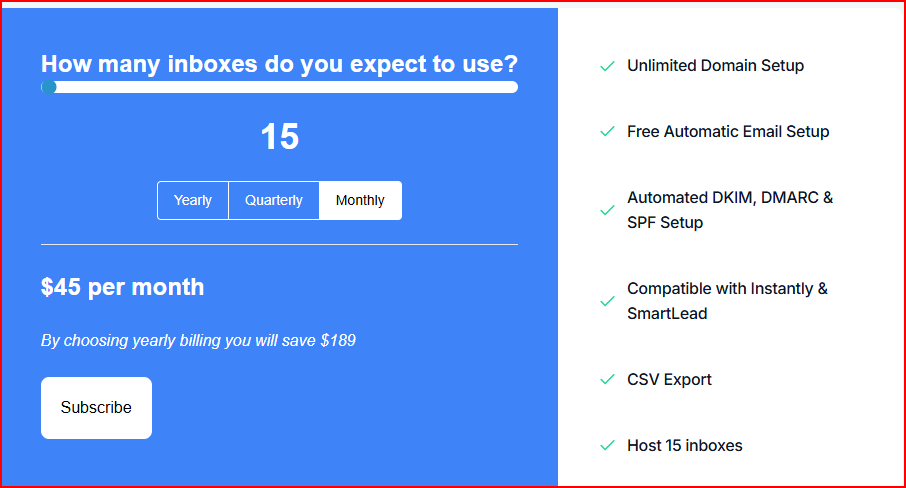
- The entry point starts at 15 inboxes
- For these 15 inboxes, the price is $45 per month
- Billing is available on a monthly, quarterly, or yearly basis
- Choosing yearly billing reduces the total cost, with a shown saving of $189
What’s included in this:
- Unlimited burner domain setup
- Automatic SPF, DKIM, and DMARC configuration
- Inbox hosting for up to 15 inboxes
- CSV export for connecting inboxes
- Compatibility with Instantly and SmartLead
In short, InboxFlow uses a per-inbox pricing model, starting at 15 inboxes, with setup and hosting bundled into the same plan.
InboxFlow Pros
- InboxFlow reduces coordination overhead by giving teams a single, shared way to prepare inboxes, instead of each person handling domains and DNS differently.
- It lowers the risk of setup delays caused by DNS misconfiguration, which is a common blocker when domains and inboxes are created manually across registrars and email providers.
- InboxFlow works well as a handoff layer between infrastructure and outreach, letting ops or technical users prepare inboxes once and pass them cleanly to outbound teams.
- The platform keeps setup scope intentionally narrow, which can be useful for teams that do not want infrastructure logic mixed with campaign logic.
- InboxFlow’s approach fits teams that prefer controlled, step-by-step onboarding of inboxes rather than automated large-scale provisioning.
InboxFlow Limitations
- InboxFlow does not show what happens after setup. There are no deliverability reports, inbox health signals, reputation scores, or engagement metrics to understand how inboxes perform over time.
- There is no built-in warmup or engagement system. InboxFlow does not simulate opens, replies, or clicks, so inbox warmup and reputation building must be handled with separate tools or manual processes.
- Infrastructure control is limited as volume increases. InboxFlow does not provide IP provisioning, IP rotation, smart sending limits, or API-based automation that help manage large-scale outreach.
- There are no deliverability protection layers. InboxFlow does not include throttling, adaptive pacing, or automatic reputation safeguards to reduce spam risk during high-volume outreach.
- Scaling becomes manual beyond a small number of inboxes. Managing more inboxes requires repeated CSV exports and uploads, with no real-time sync or automated workflow for bulk changes.
- InboxFlow stops at setup. Sending, monitoring, protection, and scaling logic all live outside the platform, which increases tool dependency as outreach grows.
Best InboxFlow Alternative: Mailforge
Mailforge is best alternative to InboxFlow that offers cold email infrastructure beyond basic domain and inbox setup.
Mailforge is built as a distributed cold email infrastructure.
It focuses on helping teams create domains and mailboxes quickly, while also supporting deliverability and scale.
Here’s how Mailforge is better than InboxFlow:
- Lower cost per mailbox
Mailforge pricing starts around $3 to $2 per mailbox per month, which can make a big difference when running many inboxes. - Faster, guided setup
Mailforge is designed to get domains and mailboxes ready in minutes, with automated DNS setup for SPF, DKIM, and DMARC built in.

- Made for cold outreach
Unlike generic email providers, Mailforge is built specifically for cold email use cases and shared infrastructure optimized for outreach. - Works with any cold email outreach software
Mailforge is compatible with Salesforge and other sending tools, so it fits into most existing outbound stacks. - Extra infrastructure-level features
Mailforge includes options like bulk DNS updates, domain transferring, multiple workspaces, SSL, and domain masking, which are useful when managing larger setups.
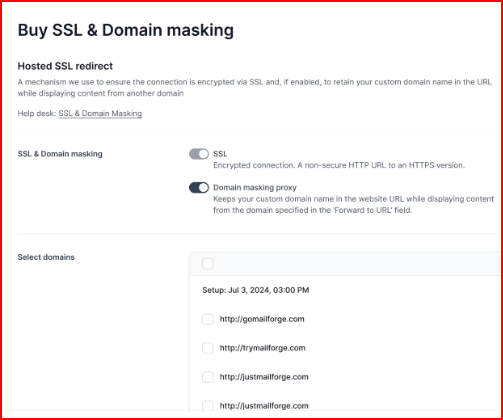
InboxFlow focuses on getting domains and inboxes set up, but Mailforge gives affordable, scalable infrastructure designed for cold outreach.
This makes Mailforge a better option for teams that want to scale inboxes easily, without using many different tools together.
Conclusion
InboxFlow works best when your need is a basic cold email setup.
It helps you buy burner domains, sets up SPF, DKIM, and DMARC automatically, and lets you export inboxes into your sending tool using a CSV file.
If you are comfortable handling sending and monitoring outside the platform, this setup can work fine at a smaller scale.
As inbox numbers grow, the limits become clearer.
InboxFlow relies on CSV exports, does not include deliverability monitoring, and does not offer infrastructure controls like IP management or automation.
It offers per-mailbox pricing, automated DNS setup, and infrastructure designed for cold outreach.r.
Set up and scale cold email infrastructure with Mailforge at just $2–$3 per mailbox per month.